Tuesday, 28 June 2016

Remove or Supress optional empty elements from target schema in Biztalk map (STRING Data Type)

Dear All,

I have a situation where in my target schema there are some optional elements whose data types are string. That elements can have value or may not have value. It means that element min occcur=0 and max occur = 1.

It will look like Name Element below snap in Source Schema:

Or  We may get empty single space under that element in source Schema like below Snap:


Solution:

By Using two functoids we can achieve this target:

1. Greater Than Functoid under Logical Functoids

2.Value mapping Functoid Under Advance Functoid.

The map will look like like below Snap:


Here in this map Name is having null value so what we did we took Greater than Functoid and that have two input parameters. In first parameter linked Name element to it and in Second parameter given one empty Space like below Snap:


and then in value mapping functoid linked first input as greater than functoid and second input parameter as Name element like below snap:


Thanks.


Get max length of data for a column in Oracle


There is a situation where a column of varchar type max length is 50. what my requirement is to know the max and min length of the data stored in that column.

Here are the queries:

Max Length of data:

Select max(length(your_col_name)) as max_length From your_table_name;

Min Length of data:

Select min(length(your_col_name)) as max_length From your_table_name;


Tuesday, 15 September 2015

There was a failure executing the receive pipeline: "Microsoft.BizTalk.DefaultPipelines.XMLReceive, Microsoft.BizTalk.DefaultPipelines, Version=3.0.1.0, Culture=neutral, PublicKeyToken=31bf3856ad364e35" Source: "XML disassembler" Receive Port: "WcfReceivePort_OracleDBBinding_XXXXXXX" URI: "oracledb://XX.XXX.XX.XX:XXXX/XXXXX/Dedicated" Reason: Cannot locate document specification because multiple schemas matched the message type "http://Microsoft.LobServices.OracleDB/2007/03/POLLINGSTMT#POLLINGSTMT".

ERROR:

There was a failure executing the receive pipeline: "Microsoft.BizTalk.DefaultPipelines.XMLReceive, Microsoft.BizTalk.DefaultPipelines, Version=3.0.1.0, Culture=neutral, PublicKeyToken=31bf3856ad364e35" Source: "XML disassembler" Receive Port: "WcfReceivePort_OracleDBBinding_XXXXXXX" URI: "oracledb://XX.XXX.XX.XX:XXXX/XXXXX/Dedicated" Reason: Cannot locate document specification because multiple schemas matched the message type "http://Microsoft.LobServices.OracleDB/2007/03/POLLINGSTMT#POLLINGSTMT".


SOLUTION:

Go to your receive location and double click on browse button of XML pipeline you will get a pop up window like below :


As you can see the first option "Allow UnrecognizedMessage" is set to "FALSE', Make it true:
I hope your error will be gone:

After making it true if you are again getting the same error then:

There is another application that uses a schema generated using the POLLINGSTMT operation
To avoid this, when you specify your connection settings to generate your metadata in VS, you should specify a unique POLLING ID (on the connection details tab), and then use the same POLLING ID when configuring your receive port too.

Thank you

Monday, 14 September 2015

Custom Pipeline to remove Unknown/Unwanted/ Characters from Incoming XML message in Biztalk.

Hi Friends,

I got a requirement where I was receiving a incoming xml message from client, that I had to process in Biztalk.

But when we received that message what we found that there was some unknown characters was added as header in that xml file. because of that files were failing at pipeline level. 

Due to some limitations client was not able to remove that header. So I had one option to use custom pipeline to remove that extra unwanted characters and make a valid xml message.

This is my scenario but you can take this example as reference for your requirement if you have:

First I will Show you the incoming message what I was getting from client:


This is my input message. in this message the part I have highlighted from Yellow color is the Unwanted characters which has been added as Header.

The part which is not highlighted, is the actual message what I suppose to receive.

The actual message will be like below snapshot:


Solution:

I will paste the complete code down, but before I would like to give a brief details what I am doing in that code.

Please note its my solution for my requirement specific to me:

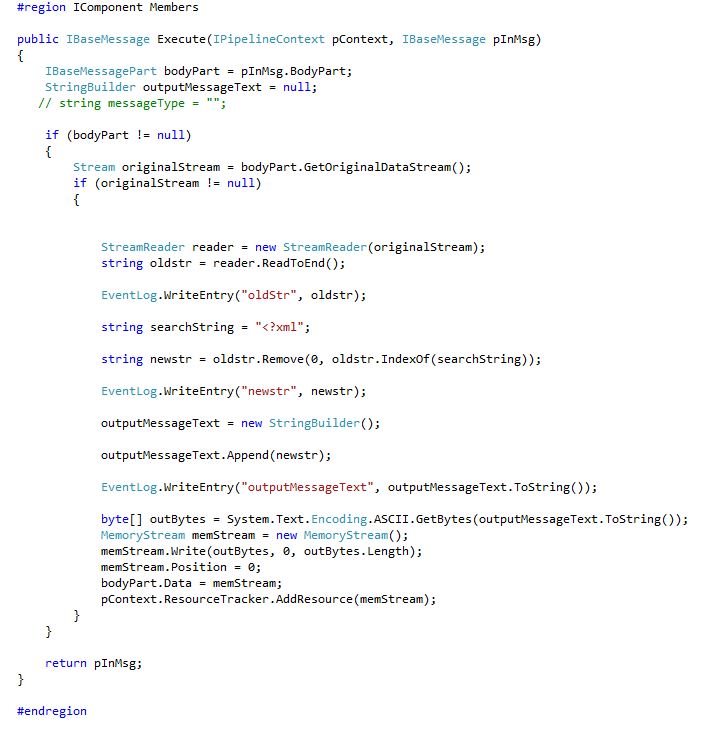
I am searching for the position of string <?xml in the incoming message and wherever I am getting that string I am removing from index 0 till that position of <?xml. This I am using at Decode level in custom pipeline.

Here is my code below:


Steps To use this pipeline:

1.Sign in the DLL.
2.Register the DLL in GAC
3.Copy the DLL to Biztalk pipeline component folder.


Thank you for reading this.

Anshu Kumar


Tuesday, 14 July 2015

Executed as user: NT SERVICE\SQLSERVERAGENT. Server '' is not configured for RPC. [SQLSTATE 42000] (Error 7411). The step failed.

Dear all, 

While running SQLSERVERAGENT we get this error. 

For my case I used below query and my problem was solved.

Please run below query:

EXEC master.dbo.sp_serveroption @server=N'<Server Name>', @optname=N'rpc', @optvalue=N'true' 
exec sp_serveroption @server='<Server Name>', @optname='rpc out', @optvalue='true'


Thank you.

Thursday, 9 July 2015

Prerequisite Skills and Knowledge for developer of BizTalk solutions

Prerequisites for Developers

A developer of BizTalk solutions must be at least moderately experienced with the use of
  • Microsoft Visual Studio 2013 and the development of .NET solutions
  • Programming with the .NET Framework
  • Extensible Markup Language (XML)
  • Extensible Stylesheet Language Transformations (XSLT)
  • XML Schema Definition Language (XSD)
  • Web Service use and development

Prerequisites for IT Professionals

The following table shows the areas of proficiency expected for a system administrator or IT professional.


An IT Pro responsible for the deployment of BizTalk solutions must be at least moderately experienced with the use of the following:
  • Microsoft Windows Installer (MSI)
  • Windows Server 2008 SP2 or Windows Server 2008 R2
  • SQL Server
  • Windows SharePoint Services
  • Performance monitoring and optimization techniques
  • Back and restore concepts and techniques
  • Internet Information Services (IIS) if exposing orchestration as Web or WCF services.

Source Taken From: https://msdn.microsoft.com/en-us/library/aa577674.aspx

Sunday, 28 June 2015

Split XML repeating child Node along with its common fields and create separate message in Biztalk Orchestration.

Hi all,

I got a requirement where I have to split a incoming xml message into individual message based on number of child nodes. Ok no need to confuse I will tell Step by Step with snapshot:

This is my Input message:


As you can see that we have child node  <TESTSTATUS_DETAIL> which has been repeating two times in this message. This can repeat n number of times.

What I want to do here that I want To Extract every child node one by one in orchestration wanted to create single separate message for each child node. For example in this message child node has been repeated two times so we will create two individual message along with its common fields.

The ouput I want like below snapshot:


this is first single message in which first child node has been selected. second message will also be of same structure but the second child node will be selected and so on third , fourth if any.

To achieve this target in orchestration I have done some steps; First I will show u complete orchestration and then step by step process:

This is my complete orchestration snapshot:


Now shape By shape details:

Shape 1 (Msg Receive Shape:)

In this I am receiving my Input message which I have shown u in above pic.


Shape 2(JobCount Expression Shape)

XmlCompleteContent = msg_Test ;

ElementCount=1;


CountVar=(System.Int32)xpath(msg_Test, "count(/*[local-name()='TEST_EVENTS' and namespace-uri()='http://TEST.BizTalk.Schemas.XML_Target_JobEvents']/*[local-name()='TESTSTATUS_DETAIL' and namespace-uri()=''])");


I have written this code in this shape. Here I have taken XmlCompleteContent as variable of type xml. Since I need to loop it through so I am initialising ElementCount=1; and using Xpath I am couting the no of child nodes in CountVar which is type of int variable.

Shape 3(Loop Shape)

In this shape I have written ElementCount<=CountVar as we do in any loop 

Shape 4(Construct Message Shape)

msg_Test=XmlCompleteContent;

XpathStatement= System.String.Format("//*[local-name()='TEST_EVENTS' and namespace-uri()='http://TEST.BizTalk.Schemas.XML_Target_JobEvents']/*[local-name()='TESTSTATUS_DETAIL' and namespace-uri()='']["+ ElementCount.ToString() +"]");
xmlContent = xpath(msg_Test, XpathStatement);


In this shape we are constructing the Msg_Test message is of type Xml Target Schema.

Below is the snapshot of Xml_Target Schema.


Within Construct message shape in second message assignment Shape we are creating our support schema which will extract the child node and assign to message Msg_orchestration Support. This message is of type Support Schema.  Below is the snapshot of Support Schema.


we have writteb the below code in 2nd message assignment shape:

varXML = new System.Xml.XmlDocument();

varXML.LoadXml(@"<TESTSTATUS_DETAIL>
  <EMPID>EMPID_0</EMPID>
  <CMP>CMP_0</CMP>
  <CCD>CCD_0</CCD>
  <KDTLCTN>KDTLCTN_0</KDTLCTN>
  <KDTUTC>KDTUTC_0</KDTUTC>
  <DNM>DNM_0</DNM>
  <KOFF>KOFF_0</KOFF>
  <LCD>LCD_0</LCD>
  <LOFF>LOFF_0</LOFF>
  <TLCTN>TLCTN_0</TLCTN>
  <TUTC>TUTC_0</TUTC>
</TESTSTATUS_DETAIL>");


msgOrchestrationSupport = varXML;

msgOrchestrationSupport=xmlContent;

Shape 5(Construct Message Shape)

In this shape we are constructing the message_test01 message which is also type of Xml Target Schema.

For achieving this we are using transformation.
Below is the Snapshot of transformation:


Shape 5(Expression_increment Shape)

In this shape I have written below Code:


ElementCount= ElementCount + 1;


                                                            Thank you for reading this post. If any errror is there please give me feedback so that I can improve. Happy Coding